Grade Shells from Drill Assays: What an Exploratory Envelope Is (and Isn't)
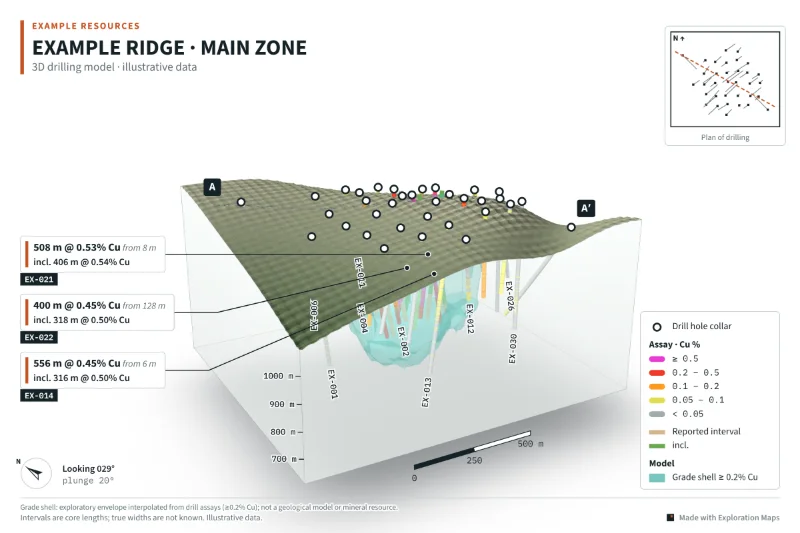
A grade shell built from drill assays is a 3D surface drawn around the volume where interpolated grade is above a cut-off. It shows where the drilling says the better grade sits and how the holes connect. It is an exploratory envelope: no geological domains, variography, top cuts, density or economic limits are applied, so it implies no tonnage or contained metal, and a public figure should say so on its face.
What a grade shell is
Drill holes are lines through a volume. A grade shell joins them up: it estimates grade between the holes and draws the surface where that estimate crosses a chosen cut-off, so the inside of the shell is the part of the drilled ground that interpolates above it. On a figure, a shell makes a set of intercepts read as one body, which is why companies like them. It is also why they need care: the shell looks like a solid fact, and between the holes it is an interpolation.
Two kinds of shell
A modelled shell comes from geological modelling software, built by a geologist with domains, structural controls and judgement, and often reviewed as part of a technical report. An exploratory envelope is a quick, rule-based interpolation of the assays alone. Both have a place on an investor figure. They should never be confused, and a figure should name which one it shows.
Exploration Maps 3D does both jobs separately: a modelled shell exported as an OBJ mesh is loaded as a model shape and drawn as supplied, while the grade shell option builds an exploratory envelope from the assays. If you are weighing the two approaches, the comparison with desktop 3D software covers where each fits.
The method in plain words
This is how the grade shell in Exploration Maps 3D is built, step by step. The same description is in the tool, under How the shell is built.
- Composite: each hole is split into 10 m length-weighted composites of the grade column the holes are coloured by. Only assayed lengths count, and a composite needs at least 5 m assayed.
- Grid: a regular grid is laid over the block, with cells about one fortieth of its width, between 5 and 25 m.
- Group the collars: holes whose collars are within 20 m of each other form one collar group and count once, so a fan of holes from one pad does not outvote the rest.
- Interpolate: at each grid point, the nearest composite from each group is found; the nearest groups within the search radius, at most four, are combined with inverse-distance-squared weights, with a 5 m minimum distance.
- Require support: at least three groups must be in range, or the point is left unestimated.
- Set the reach: the search radius is 75 m, or 1.5 times the median spacing between collar groups for wider drilling. Nothing is estimated above the terrain or collar surface.
- Draw: the surface is extracted at the cut-off with marching cubes and lightly smoothed.
What it is not
No geological domains, variography, top cuts, density or economic limits are applied, and the distances above are screening choices, not parameters fitted to your deposit. So the shell is not a geological model, not a mineral resource, and implies no tonnage or contained metal. Where drilling ends, the shell can close off or break into pieces; those edges are where the data stops, not geological limits. A shell that stops at the last hole says "we have not drilled further", not "the mineralisation ends here".
Choosing the cut-off
Pick a cut-off that matches how the release describes the mineralisation, usually the broad-interval cut-off used for the callouts. Then try a cut-off either side. If a small change makes the shell grow or shrink dramatically, the drilling is not constraining it and the figure should not lean on its shape. The Advanced settings let you set the search radius and cell size; leave them automatic unless you can explain the change, and record any change you make.
How to label it on a public figure
When the shell is shown, Exploration Maps 3D adds this line to the figure's footnote: "Grade shell: exploratory envelope interpolated from drill assays (≥ cut-off); not a geological model or mineral resource." The legend names it with its cut-off. Keep both. If you crop the figure or hand the layers to a designer, make sure the disclosure line survives, because the image will be shared without the release around it.
A checklist before you publish a shell
To see the effect of the cut-off yourself, load the sample in Exploration Maps 3D, turn on Grade shell from assays in the Layout step, and change the value. The full figure workflow is in how to make a 3D drill hole figure.
- The figure says it is an exploratory envelope, with its cut-off
- The grade column is the one the release reports (Cu, or a stated CuEq)
- The shell was checked at cut-offs either side of the one shown
- Edges are not described as limits of mineralisation
- No volume, tonnage or contained metal is quoted from the shell
- The QP has reviewed the figure