Drill Hole Cross Sections vs 3D Block Figures for Investor Presentations
Use a cross section when the story is depth and continuity along one line: how far an intercept extends, how holes connect, what sits below the last result. Use a 3D block figure when the story is the whole program in its setting: how many holes, which directions, how the zone sits under the terrain. Most drill releases and decks are clearest with both, made from the same data and style, plus a plan map that shows where the section line runs.
Two figures, two different jobs
Investors look at drill figures for two questions. How good is this hole, and how does it fit with the others? And how big could this be? A cross section answers the first question precisely and the second poorly. A 3D block figure answers the second at a glance and the first approximately. Choosing between them starts with which question the release or slide is trying to answer.
What a cross section does well
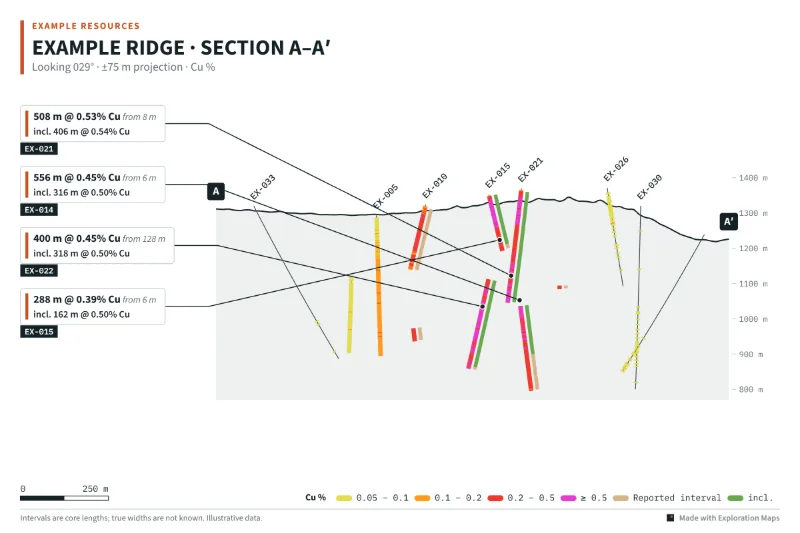
A section is a slice. It shows holes against true depth along a single line, so lengths, depths and the space between intercepts can be read off a scale. It is the natural home for a step-out story (the new hole extends the zone 120 m down dip) and for a geological interpretation drawn between holes, because the reader can see exactly where the data is.
- True depth and elevation along the line, with a readable scale
- Continuity, or a gap, between neighbouring holes
- Room for full intercept callouts without perspective crowding
- Prints cleanly in a technical report and at A4
Where sections mislead
Holes are rarely all on the line. A section projects holes within a window onto the plane, so a hole 70 m in front of the section can appear to connect with one 70 m behind it. A flattering section line can be chosen to run through the best holes and miss the weak ones. And a single slice says nothing about the third dimension. The fixes are simple: state the projection width on the figure, show the section line on a plan or inset, and draw the holes that fall inside the window whether they are good or not.
What a 3D block figure does well
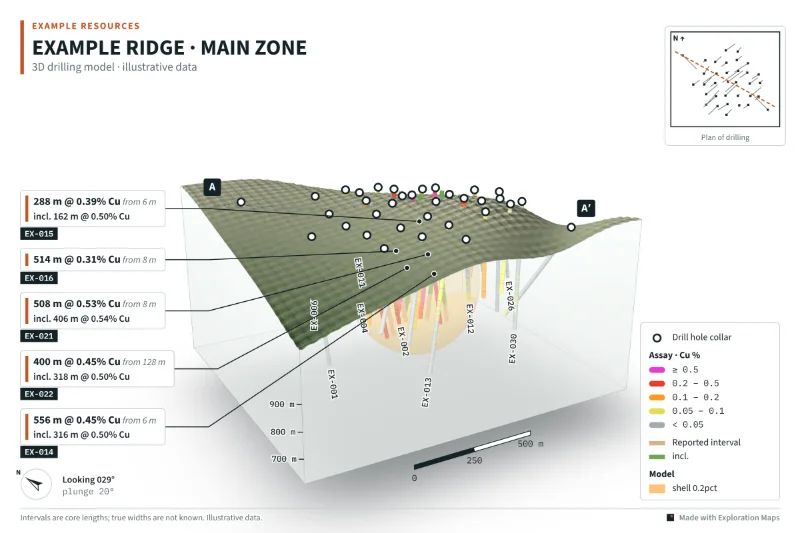
A block figure shows the whole program at once: every hole, its direction, the terrain above, and the drilled volume in context. It is the fastest way to show scale, a multi-directional program, or how a zone plunges, and it works on social media and on the first slide of a project section in a way that a section rarely does.
- All holes at once, including holes drilled in different directions
- Terrain and the relationship between the zone and the surface
- Scale of the system relative to the drilled area
- A single image that reads without a technical background
Where 3D figures mislead
Perspective foreshortens distances: a hole pointing at the camera looks short, and depth is hard to judge without a scale. Holes hide behind each other. Vertical exaggeration makes zones look steeper and thicker. And a translucent shape inside the block reads as a solid, known body even when it is an interpolation. Good 3D figures print the view direction and plunge, show any vertical exaggeration, keep a scale bar on the block, and label every shape for what it is.
If you show an interpolated shape, read what an exploratory grade shell is (and isn't) before it goes in a deck.
Side by side
| Cross section | 3D block figure | |
|---|---|---|
| Best for | Depth, continuity, step-outs | Program overview, scale, setting |
| Reads distance accurately | Yes, along the line | Approximately |
| Shows every hole | Only those in the projection window | Yes, if none are hidden |
| Main risk | Projection and a selective line | Perspective, hidden holes, exaggeration |
| Must state | Section line, projection width, scale | View direction, plunge, any exaggeration, scale |
| Typical place | Technical report, release detail | Release lead figure, deck, social |
Which to use when
- One or two holes extending a known zone: a section through them, with the plan showing the line.
- A full program or a first release from a new target: a 3D figure as the lead image, a plan map of all collars, and a section if one hole carries the news.
- An investor deck: a 3D figure for the project overview slide and a section on the results slide.
- A technical report: sections and plans; 3D figures support them but rarely replace them.
- Social media: a 3D figure in Square or Portrait format, with the headline intercept called out.
Make them agree
The worst outcome is a 3D figure and a section that disagree: different colour limits, a callout rounded differently, a hole missing from one of them. Build both from the same data and the same style. In Exploration Maps 3D the section A–A′ line is drawn on the 3D figure and in its plan inset, both figures share the grade colours and callouts, and both export at the same size, so a reader moving between them sees one story.
The step-by-step workflow is in how to make a 3D drill hole figure, and the plan-view counterpart is in how to make a drill results map. If your team would rather have the full figure set built and kept current for you, see investor map and figure design for junior mining companies.
A short checklist for either figure
- Callouts match the release table exactly
- Core lengths are described as such unless true widths are known
- Holes not yet reported are labelled as pending rather than drawn as blank traces
- Scale, orientation and any projection or exaggeration are on the figure
- The plan or inset shows where the section line runs
- The QP has reviewed the exported figures