Exploration Maps 3D vs Desktop 3D Software (Leapfrog Viewer, Geoscience ANALYST)
They do different jobs. Leapfrog Viewer and Geoscience ANALYST are free desktop 3D viewers from geological software vendors, built for exploring models and data interactively alongside modelling work. Exploration Maps 3D is a browser tool (in beta) that turns collar, survey and assay CSVs into a branded, annotated 3D figure and section for news releases and investor decks. It does no geological modelling or resource estimation. Many teams will use a desktop package for the geology and a figure maker for the image that goes public.
The short answer
If your question is "what does the orebody look like and how do these holes relate to the model?", you want 3D geological software and its viewer. If your question is "what figure goes in tomorrow's news release?", you want something that produces a finished, branded, annotated image quickly and the same way every time. These overlap less than it seems, and this page sets out where each is the better tool.
Leapfrog Viewer
Leapfrog Viewer is a free viewer from Seequent for opening and exploring scenes and models built in Leapfrog, its implicit geological modelling software. It lets people without a Leapfrog licence, such as managers, partners or reviewers, rotate and inspect the model a geologist has built. Its strength is fidelity to that model: what the viewer shows is what the modeller built.
Geoscience ANALYST
Geoscience ANALYST is a free 3D visualisation application from Mira Geoscience for viewing and integrating geological, geophysical and drilling data, built around Mira's open GEOH5 data format. A paid Pro edition adds further tools. Its strength is bringing many data types into one interactive 3D scene.
Exploration Maps 3D
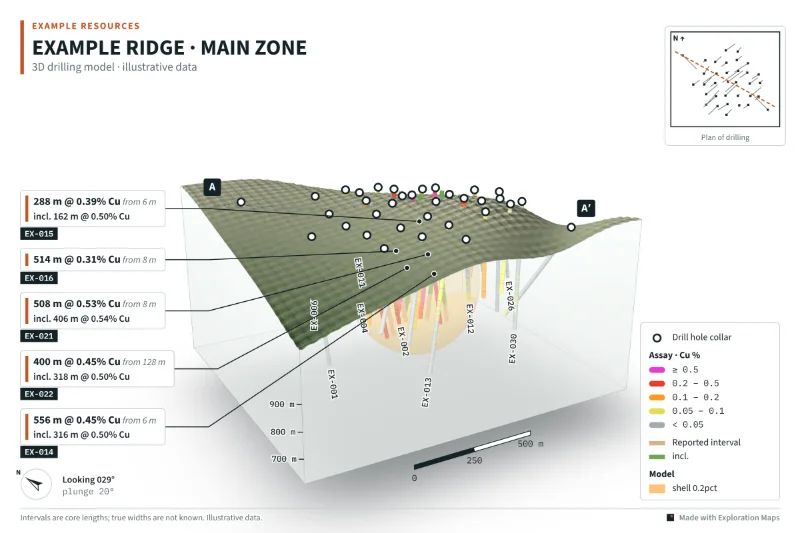
Exploration Maps 3D runs in a web browser with nothing to install. You drop in collars, assays and optionally surveys, topography and OBJ model shapes as CSV or ZIP, and it produces a figure: terrain (with a satellite drape once the coordinate system is set), a glass or solid block with wall labels, grade-coloured traces, intercept callouts, a plan inset, a section A–A′, and export sizes for slides, news releases, social posts and A4 print, plus a layers ZIP for designers. It also has presentation-focused helpers: "Assays pending" labels, a metal-equivalent calculator that prints its formula in the footnote, a display cut-off, data checks, and an optional grade shell interpolated from assays that is labelled as an exploratory envelope.
Capabilities and limits
Geological modelling, estimation and geophysical processing remain jobs for specialist software. If a figure needs a modelled solid, export it as an OBJ mesh from the software that built it, if that software supports OBJ export, and load it as a model shape; it is drawn as supplied. For what the assay-based shell does and does not mean, see grade shells from drill assays.
- No implicit or explicit geological modelling or block-model estimation
- No resource estimation; its grade shell is an exploratory envelope, not an estimate
- No geophysical processing or inversion
- Company properties can store imported drill tables and check imports; source-data validation still needs geological review
- Interactive sharing is available through read-only 3D links and embeds; it does not replace a geological modelling package
Where a figure maker helps
Turning a viewer screenshot into a release figure usually means a designer adding a title block, legend, scale, callouts, logo and disclosure notes by hand, then doing it again next month with slightly different numbers. A figure maker builds those elements from the data: callouts come from the assays, the legend from the colour limits, the footnote from the assumptions, and the export is the right size. The next release reuses the same project with new assays.
The full workflow is in how to make a 3D drill hole figure.
Choosing for your team
A team with a modeller and a current geological model already has the 3D picture; what it often lacks is a quick, repeatable way to turn that picture into a public figure with the right callouts and notes. A team without modelling software, typically early in a drill program, may only need to show holes, grades and terrain clearly, and can do that from its CSV exports alone. Reviewers can rotate and zoom an Exploration Maps 3D figure through a shared link or embed. Use a desktop viewer when the review needs the native geological model and its specialist tools. And a figure that will be published should always be checked against the source the geology came from, whichever tool drew it.
Using them together
- Model and interpret in your geological software; keep the drill database as the source of truth.
- Export collars, surveys and assays as CSV, and any model solids you want shown as OBJ.
- Build the public figure and section in Exploration Maps 3D, with the release's callouts and footnotes.
- Have the QP review the exported figure against the model view and the release table.
Side-by-Side Comparison
| Leapfrog Viewer | Geoscience ANALYST | Exploration Maps 3D | |
|---|---|---|---|
| Made by | Seequent | Mira Geoscience | Exploration Maps |
| Main job | Viewing Leapfrog models and scenes | Viewing and integrating geoscience data in 3D | Making presentation figures from drill data |
| Runs | Desktop application | Desktop application | Web browser, nothing to install |
| Typical input | Scenes and models from Leapfrog | GEOH5 projects and imported data | CSV collars, surveys, assays; OBJ meshes; topography points |
| Output | Interactive 3D view | Interactive 3D view | Branded PNG figures and section; designer layers ZIP; interactive share links and embeds |
| Cost | Free viewer | Free; paid Pro edition | Free to build and export (beta) |