How to Import GeoJSON Data into a Mining Map
Upload a GeoJSON or JSON file with WGS84 longitude/latitude coordinates, then assign the Claims role and style the boundary. Zipped Shapefiles and KML/KMZ can also be imported directly; conversion to GeoJSON is optional.
Choose the file you already have
You do not need to convert a Shapefile or KML just to open it in Exploration Maps. Keep a copy of your original data and use the corresponding import path below.
| File | What to supply | Coordinate handling |
|---|---|---|
| GeoJSON / JSON | A FeatureCollection with geometry and properties | Use WGS84 longitude, latitude (EPSG:4326). |
| Zipped Shapefile | Matching .shp, .shx, .dbf and .prj files in one .zip | The .prj supplies the source projection for conversion. |
| KML / KMZ | Upload the .kml or compressed .kmz directly | KML uses geographic longitude/latitude. |
| CSV | A header row and a coordinate pair for each point | Use WGS84 decimal degrees; convert projected eastings/northings first. |
Try a boundary with a known result
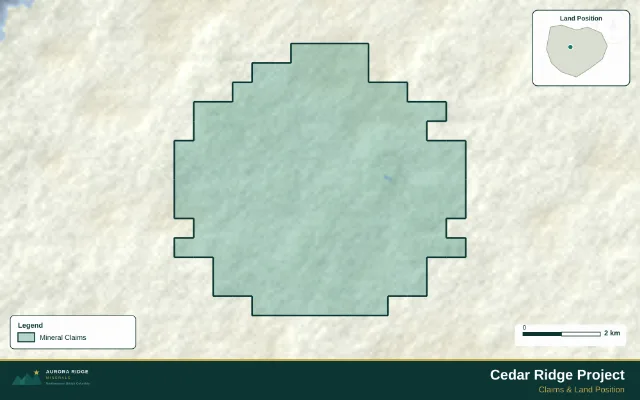
This sample contains 161 fictional claim cells near 55.45° N, 127.20° W. It is the boundary used in the Claims gallery example below. It is not an actual title record.
Download the Cedar Ridge GeoJSON boundary · Read the sample notes
Import and check the location
Open the upload workflow, select the file, and review the feature preview. Click Add to map, then wait for the map to fit its bounds. The sample should form a compact block in northwestern British Columbia. For your own file, compare the position with a known coordinate or landmark before styling it. Attributes remain available as feature properties.
Style the boundary and export
Assign the Claims role, choose a fill colour and border, and turn on Dissolve inner borders if you want the claim cells to read as one outline. Give the legend a meaningful name. Add a project title, source/date text, scale bar and north arrow, then check your PNG at the size it will be used.
Open the finished Claims example to compare its styling with your import. A GeoJSON file supplies geometry and attributes; it does not carry this editor layout.
Fix a missing projection or misplaced file
| Symptom | What to check |
|---|---|
| Projected Shapefile without a .prj | Include the matching .prj in the ZIP. Do not rename an unrelated projection file to make it fit. |
| GeoJSON has six- or seven-digit coordinates | These may be projected metres. Re-export from the known source CRS to WGS84 before importing. |
| Map is in the wrong hemisphere | Check longitude/latitude order and negative signs. Western longitudes are negative. |
| A few features are far from the main block | Inspect those coordinates and remove invalid records in a copy of the source. |
When conversion is useful
Convert when a source format is unsupported, a geometry needs repair, or you want one portable GeoJSON file. In your GIS, select the correct source coordinate system and export to EPSG:4326. A projection cannot be recovered reliably from an unknown UTM zone or a guessed datum.
For a Shapefile, keep the companion files together. See the Shapefile upload workflow and supported inputs and data sources.
How this guide was checked
Prepared by Exploration Maps. Workflow reviewed on September 15, 2026 against the current importer and editor. Demo files use fictional data; registry examples are dated observations. See our data coverage and methodology for sources, freshness and limitations.