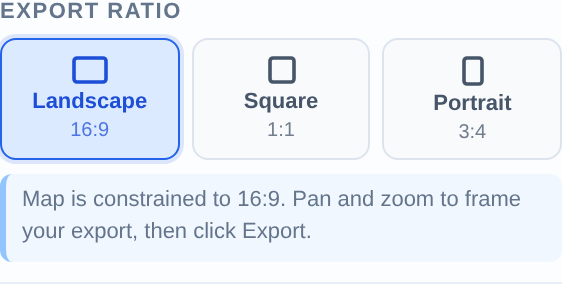
To export a mining map as a PDF, set your ratio in the Export section (Letter, A4, or 16:9), click the PDF button in the toolbar, choose the matching page size, enter your work email to remove the watermark, and download. Use 3× pixel ratio for anything that will be printed.
Turn public claim data into a clean map.No GIS experience needed — import, style, and export in minutes.
Frame the view — everything important inside the ratio guides, nothing critical near the edges
Title block filled in: project, company, date
Legend, scale bar, and north arrow enabled
Ratio set to match your target page size (Portrait 3:4 for Letter Portrait, Landscape 16:9 for slides)
PDF or PNG?
Use PDF for anything printed or filed — technical report figures, permitting documents, news-release figures that go to a wire service. Use PNG for slides, websites, and email. PDFs preserve exact page dimensions; PNGs are lighter and drop straight into PowerPoint.
Pick the right page size
Page size
Dimensions
Use it for
PowerPoint 16:9
13.33 × 7.5 in
Presentation-ready PDF slides
Letter Landscape
11 × 8.5 in
North American report figures
Letter Portrait
8.5 × 11 in
Full-page report figures, permit applications
A4 Landscape
297 × 210 mm
International reports
News Release Figure
8 × 6 in
Wire-service news release attachments
Set the ratio, then export
Activate the matching ratio in the Export section first — the on-screen guides show exactly what the PDF will contain, so you frame once and export without surprises.
Match the on-screen ratio to your PDF page size before exporting.
Print quality: use 3× pixel ratio
3× for print, 2× for screens
In Export Settings, set Pixel Ratio to 3× for any printed PDF — roughly 300 DPI equivalent, so fine claim boundaries and small labels stay crisp on paper. 2× is fine for PDFs that will only be viewed on screen.
Removing the watermark
Enter your work email in the export dialog to unlock clean, watermark-free exports. You only do this once per browser.
Import your file and export an investor-ready map.Open the editor and have a shareable map in minutes.
The map is embedded at your chosen pixel ratio: 2× is sharp on screens; 3× is print quality (~300 DPI equivalent at the chosen page size). For NI 43-101 report figures, use 3×.
Can I export a PDF sized for a news release?
Yes — the News Release Figure size (8 × 6 in) matches what wire services and IR teams typically request, and pairs with the Landscape ratio guides for framing.
Is the PDF vector or raster?
The map itself is a high-resolution raster embedded at exact page dimensions — consistent output regardless of layer complexity, and what report printers expect. Use 3× pixel ratio to keep it print-crisp.
Why does my exported PDF crop differently from my screen?
The export follows the ratio guides, not your browser window. Activate the ratio that matches your page size before framing, and keep key content inside the guide lines.
Can I export multiple page sizes from the same map?
Yes — the map isn't altered by exporting. Switch ratio/page size and export again; a common workflow is a 16:9 PNG for the deck plus a Letter PDF for the report from the same project.